




WeAreDevelopers LIVE Dec 1, 2023

Creating a routing app with Google Maps API from scratch

Germán Álvarez

Transform a simple HTML element into a robust location-aware application. Master the Google Maps API, asynchronous geolocation, and dynamic route rendering from scratch.

Pause
Mute Enter Fullscreen
#1 about 2 min

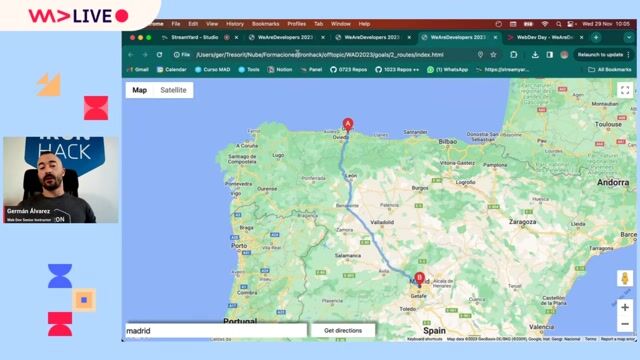
Overview of the three Google Maps routing applications

Three instructional applications demonstrate foundational API capabilities spanning custom visual styling, physical geolocation tracking, and algorithmic route generation.

#2 about 8 min

Setting up the HTML structure and external dependencies

Setting up the foundational HTML document requires injecting third-party scripts, obtaining authentication keys, and explicitly defining container heights.

#3 about 4 min

Rendering the map instance and adding location markers

Generating a basic map view relies on specifying baseline zoom levels and geographical coordinates prior to appending location markers.

#4 about 3 min

Applying custom JSON styles to the map components

Map visual aesthetics are entirely overwritten by supplying a comprehensive JSON configuration object to the internal settings.

#5 about 12 min

Fetching and implementing device geolocation data via API

The internal navigator API prompts browsers to supply local device coordinates which dynamically reposition the digital map center.

#6 about 7 min

Creating the user interface for the routing application

Expanding the foundational HTML introduces interactive input elements and event listeners capable of capturing destination data strings.

#7 about 10 min

Fetching route details using the Directions Service API

The programmatic Directions Service instance accepts precise origin and destination values to algorithmically calculate optimal travel paths.

#8 about 3 min

Drawing the calculated route with the Directions Renderer

Validated navigational data sequences are physically sketched across the map topology using dedicated Directions Renderer instances.

#9 about 10 min

Final code walk-through and audience Q&A session

A summarized architectural review precedes discussions on maintaining API rate limits, masking authentication credentials, and deployment safety.

Matching moments

2:59 min

Rendering geographical maps with React Map GL

Daisy Muyldermans · LIVE

3:22 min

Demonstrating on-device indoor navigation in real time

Precious Osaro Precious Osaro · World Congress 2026 Europe

2:46 min

Migrating legacy mapping tools to current geocoding systems

Chris Heilmann +5 · LIVE

2:42 min

Executing a live multicloud routing demonstration

Alex Soto Alex Soto · LIVE

1:40 min

Building a modern interactive map with AI agents

Angie Jones Angie Jones · World Congress 2025

2:20 min

Building a location-aware city sightseeing mobile application

Mario Bodemann Mario Bodemann

Upcoming sessions on this topic

Open session

World Congress 2026 North America

September 25, 2026 · 10:20–10:50

Stage 2

API = Some REST and HTTP, right? RIGHT?!

Rustam Mehmandarov

Passionate computer scientist

Rustam Mehmandarov
Open session

World Congress 2026 North America

September 24, 2026 · 11:00–11:30

Stage 6

Accelerating development and managing agents with the GitHub Copilot app

Christopher Harrison

Senior Developer Advocate at GitHub

Christopher Harrison
Open session

World Congress 2026 North America

September 24, 2026 · 12:50–13:20

Stage 7

Architecting Agentic Apps: WebMCP, A2UI, and Agent Experience

Ankita Sood

Sr. Principal Engineer @ Secureworks | Angular GDE

Ankita Sood
Open session

World Congress 2026 North America

September 24, 2026 · 14:50–15:20

Stage 9

How to generate business value through performance optimizations

Nikolai Sidiropulo

Software Engineer at Meta

Nikolai Sidiropulo
Open session

World Congress 2026 North America

September 23, 2026 · 14:20–14:50

Stage 2

Build Interactive Copilot Experiences with Canvas Extensions

James Clancey

Principal Product Manager at GitHub

James Clancey
Open session

World Congress 2026 North America

September 24, 2026 · 11:00–13:00

Stage 8

Optimizing Coffee Stand Locations with Gemma 4 and BigQuery

Shir Meir Lador

AI leader @ Google

Shir Meir Lador