
Even if you haven’t heard the term bento before, you’ve almost certainly seen a bento layout on the web in recent years.
The name, taken from traditional Japanese bento meals where different dishes are neatly separated into compartments, reflects how bento layouts are made up of distinct sections arranged in boxes of varying sizes, with dense yet aesthetically appealing grids.
They seem complex, but CSS grid makes building them surprisingly simple, and in this article we’ll explore some of the features and syntax that make it so powerful.
There are two demos for this article, and you can find all of the code featured over on our GitHub.
In the first example, we’ll use the span keyword with utility classes and let gvrid’s auto-placement handle positioning. In the second example, we’ll use explicit line positioning (1 / 7 syntax) to precisely control where each tile appears. Both demonstrate different CSS Grid techniques for achieving the same result.
Setting Up the Grid
Both approaches start with the same foundation, a 12-column grid system.
To start with, we’ll set up the basic rules of our grid: It’s a grid, with 1rem of spacing between items, with twelve equal columns, and a minimum row height:
.bento {
  display: grid;
  gap: 1rem;
  grid-template-columns: repeat(12, minmax(0, 1fr));
  grid-auto-rows: 90px;
}
The trickiest part here is grid-template-columns..., which creates 12 equal-width columns, gives each column 1/12th of the total width with 1fr and lets it shrink below its content size down to 0. Wrapping this in the repeat(12, ...) function applies this same sizing rule to all 12 columns.
Approach 1: Auto-placement with grid-auto-flow
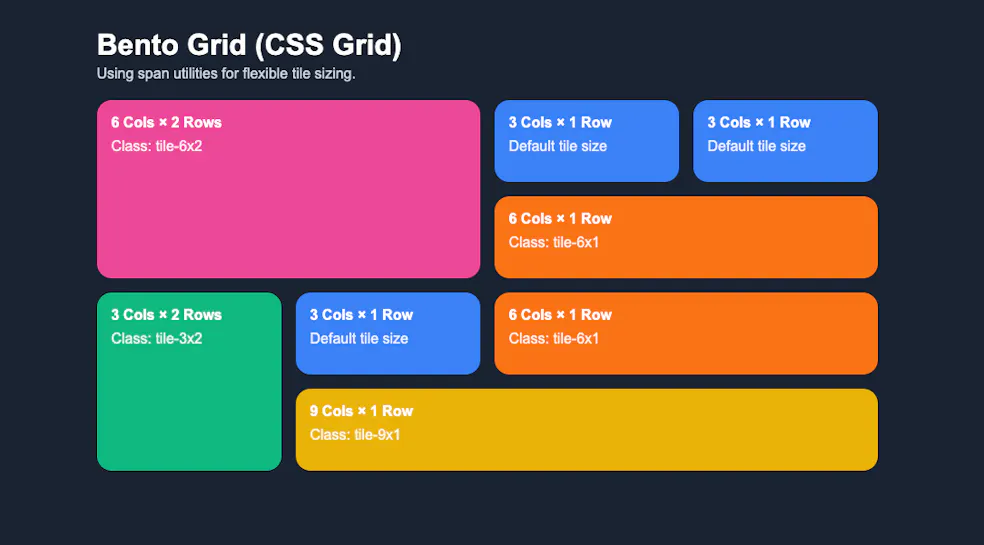
Our first approach uses utility classes to create tiles of varying sizes. We use span keyword to specify how many columns or rows a tile occupies without calculating grid line numbers, and then use grid-auto-flow: dense, to automatically place tiles and fill gaps.
First, we set default sizing on the base .tile class:
.tile {
  /* ...styling above here - padding, border-radius and background-color */
  grid-column: span 3;
  grid-row: span 1;
}
Now, rather than defining the position of each tile, we’ll use one line of CSS magic to do it automatically With this, we can lay out the tiles and fill gaps with smaller ones that fit, even if they appear earlier in the HTML.
Note: We only recommend this if you do not require the tiles to be in a specific order.
.bento {
  grid-auto-flow: dense;
}
Next, we create utility classes that override the default sizing. Here’s an example:
.tile-6x2 {
  grid-column: span 6;
  grid-row: span 2;
  background: #ec4899;
}
The span keyword makes it easy to control sizing: grid-column: span 6 means “span 6 columns of 12” without needing to know the exact grid line numbers.
When you add these utility classes to tiles (e.g., class="tile tile-6x2"), they override the default sizing, and grid’s auto-placement handles the rest. Our HTML looks like this:
<article class="tile tile-6x2">
  <h2>6 Cols × 2 Rows</h2>
  <p>Class: tile-6x2</p>
</article>

<article class="tile">
  <h2>3 Cols × 1 Row</h2>
  <p>Default tile size</p>
</article>
You can create as many utility classes as needed, .tile-6x1, .tile-3x2, .tile-9x1 and dense will make them fit as efficiently as possible.
Finally, see this approach in action.
Approach 2: Specific Positioning with grid-column and grid-row
In our second approach, we don’t use dense, and instead we pre-define the exact layout in our CSS using the :nth-child() pseudo-class. This positions tiles based on their order in the HTML, and gives us maximum control:
.tile:nth-child(1) {
  grid-column: 1 / 7;
  grid-row: 1 / 3;
}
/* ... */
Here, grid-column: 1 / 7 uses explicit line numbers, starting at grid line 1 and end at grid line 7 (spanning 6 columns), with the same approach for rows.
This approach gives you complete control over the layout, but it’s less flexible: if you add or remove tiles, you might need to update the :nth-child() selectors, but it’s great when you want to fix your bento layout in place.
Now, check out this approach on our demo page.
Conclusion
Both approaches create beautiful bento layouts while showcasing different CSS Grid techniques. With grid-auto-rows you can automatically-create layouts by combining it with utility classes, and define complex layouts with grid-column and :nth-child.
Be sure to take a look at the GitHub, you can see how we made this responsive so that your complex bento adapts beautifully to different screen sizes.