
World Congress 2023 Nov 10, 2023

Mastering Keyboard Accessibility

Tanja Ulianova

Ditch the `<div>` click listeners. Master modern focus management, native HTML, and the `:focus-visible` pseudo-class to eliminate up to 80% of your keyboard accessibility bugs instantly.

Pause
Mute Enter Fullscreen
#1 about 3 min

Understanding accessibility and universal impairment reasons

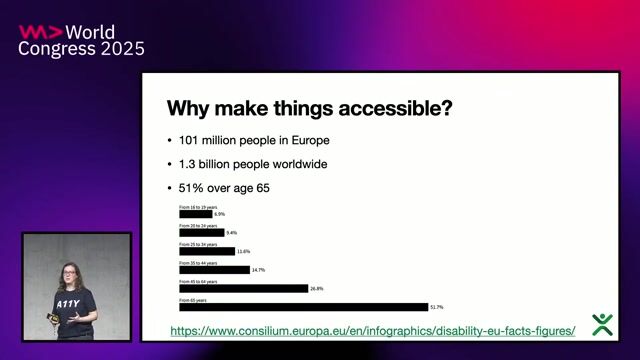
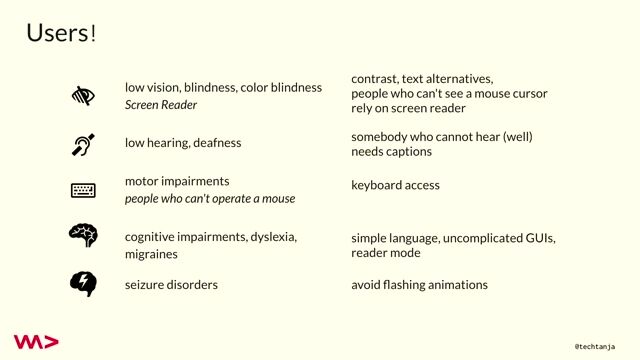
How different physical, situational, and age-related impairments create the universal need for accessible software interfaces.

#2 about 3 min

Identifying disabilities and assessing assistive technology tools

Familiarizing developers with the alternative input output devices users rely on to navigate digital content effectively.

#3 about 2 min

Meeting legal requirements for keyboard accessibility standards

Preparing for legal mandates like the European Accessibility Act which require digital platforms to provide equal access.

#4 about 2 min

Targeting web content accessibility guidelines for keyboards

Applying assistive technologies to leverage operating system keyboard APIs strictly following standardized web guidelines.

#5 about 4 min

Managing browser tabbing order and the tab index

Aligning the markup structure with natural reading flows ensures a logical path for reliable keyboard positioning.

#6 about 3 min

Controlling complex interactions using inert elements

The HTML inert attribute and carefully constructed focus traps prevent visitors from accidentally bypassing modular form content.

#7 about 2 min

Simplifying component development with native popovers

Modern HTML tags implicitly handle intricate keyboard events across overlapping components like modal dialogs and toasts.

#8 about 3 min

Providing clear visual feedback with focus indicators

Styling focused interaction states prominently via robust CSS pseudo-classes prevents operators from losing screen context tracking.

#9 about 4 min

Choosing native semantic HTML over custom wrappers

Utilizing standardized button tags completely bypasses building convoluted synthetic events and automatic accessibility property bindings.

#10 about 2 min

Reviewing the standard keyboard accessibility testing checklist

Validating structural markup trees and verifying element highlighting logic systematically helps guarantee functional input flows everywhere.

#11 about 2 min

Finding professional training and web accessibility resources

Supporting team advancement through specialized online training modules helps modern organizations achieve technical standards certifications securely.

#12 about 3 min

Validating custom software focus traps and contrast stylings

Balancing aesthetic visual overrides with accessible contrast profiles handles extreme variations effectively for custom interactive utilities.

Matching moments

4:49 min

Finding accessibility issues through manual keyboard navigation testing

Emma Dawson Emma Dawson · World Congress 2025

52 sec

Enabling keyboard navigation with visible focus indicators

Verónica Morales Beltrán Verónica Morales Beltrán · Europe 2026 Virtual

3:08 min

Introduction to building accessible web frontends

Konstantin Tieber · World Congress 2022

3:36 min

Enhancing website navigation through logical keyboard accessibility

Chris Heilmann +2 · LIVE

8:18 min

Building interactive accessibility learning resources for web developers

Chris Heilmann +2 · LIVE

6:11 min

Preventing UI overlays from breaking standard keyboard accessibility

Chris Heilmann +2 · LIVE

Upcoming sessions on this topic

Open session

World Congress 2026 North America

September 25, 2026 · 11:00–11:30

Stage 6

Secure-by-Inclusion: Preventing Accessibility Barriers from Becoming Security Vulnerabilities

Radostina (Ina) Tsvetkova

Norwegian Directorate of Labour and Welfare (NAV), Senior Advisor in Digital Accessibility and Inclusive Design

Radostina (Ina) Tsvetkova
Open session

World Congress 2026 North America

September 25, 2026 · 09:40–10:10

Stage 5

Vibe Coding Accessibility

Karl Groves

Focused on actively fixing accessibility

Karl Groves
Open session

World Congress 2026 North America

September 25, 2026 · 15:30–16:00

Stage 6

Small LLM in your Browser: Huge Opportunities for Web Applications

Daniel Ostrovsky

UI/UX Architect at Payoneer | AI Architect | Full Cycle Development Expert | Public Speaker | Open Source Contributor |

Daniel Ostrovsky
Open session

World Congress 2026 North America

September 24, 2026 · 10:20–10:50

Stage 1

The Browser Is Becoming an AI Runtime

Ajit Varma, Will Bryk

Ajit Varma
Will Bryk
Open session

World Congress 2026 North America

September 24, 2026 · 12:50–13:20

Stage 7

Architecting Agentic Apps: WebMCP, A2UI, and Agent Experience

Ankita Sood

Sr. Principal Engineer @ Secureworks | Angular GDE

Ankita Sood
Open session

World Congress 2026 North America

September 24, 2026 · 16:10–16:40

Stage 3

Sandboxing the Swarm: Building Secure, Serverless AI Agents with Wasm

Lena Hall, Thorsten Hans

Lena Hall
Thorsten Hans